

Understanding HTML Tags and Elements

When you open any website, what you’re really looking at is HTML doing its job quietly in the background. Before colors, animations, or fancy layouts come into play, HTML builds the basic structure of the webpage.
Think of HTML as the skeleton of a website. Without it, the page has no shape.
What is HTML and Why Do We Use It?
HTML (HyperText Markup Language) is the standard language used to create webpages.
We use HTML to:
Structure content on the web
Tell the browser what each piece of content is
Define headings, paragraphs, images, links, buttons, and more
HTML doesn’t make things beautiful — it makes things exist.
What Is an HTML Tag?
An HTML tag is a keyword wrapped inside angle brackets < >.
Example:
<p>
Tags tell the browser how to treat content.
Think of it like a sentence:
The tag is the grammar rule
The content is the actual sentence
Opening Tag, Closing Tag, and Content
Most HTML tags come in pairs.
Example:
<p>Hello, World!</p>
<p>→ Opening tag</p>→ Closing tagHello, World!→ Content
Together, they form something meaningful.
What Is an HTML Element?
This is where beginners usually get confused 👀
An HTML element includes:
Opening tag
Content
Closing tag
So this entire thing is one HTML element:
<p>Hello, World!</p>
Tag ≠ Element
Tag is just
<p>Element is
<p>Hello, World!</p>


Self-Closing (Void) Elements
Some HTML elements don’t need closing tags.
Example:
<img src="image.jpg" />
<br />
<hr />
These are called self-closing or void elements because they don’t wrap content.
Common ones include:
<img><br><hr><input>
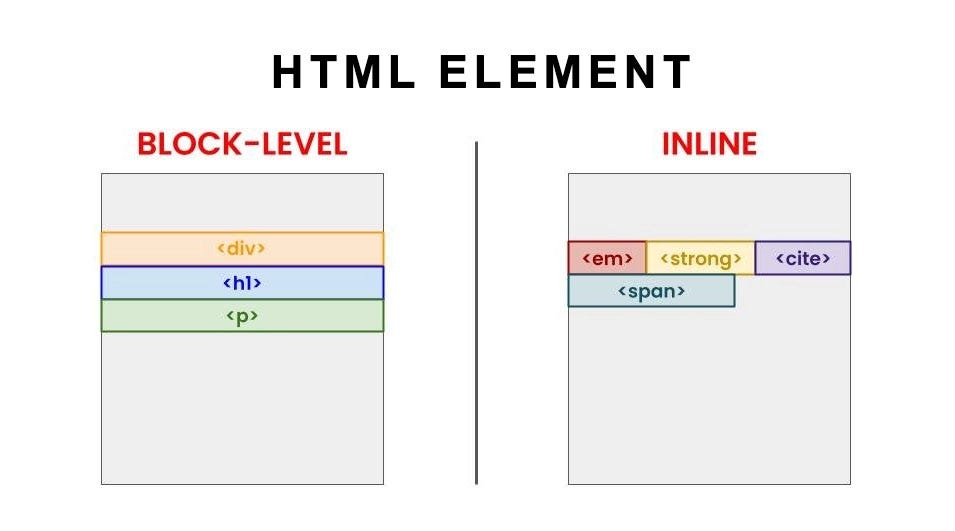
Block-Level vs Inline Elements
This is a very important concept in layout.
Block-Level Elements
Take full width
Start on a new line
Examples:
<div></div>
<p></p>
<h1></h1>
Inline Elements
Take only as much space as needed
Stay in the same line
Examples:
<span></span>
<a></a>
<strong></strong>
Commonly Used HTML Tags
Here are some beginner-friendly and commonly used tags:
<h1>Heading</h1>
<p>Paragraph</p>
<div>Container</div>
<span>Inline text</span>
<a href="#">Link</a>
<img src="image.jpg" />
These tags are enough to build basic webpage structure.
How to Practise HTML the Right Way
One of the best habits you can build as a web developer is inspecting HTML.
Right-click any webpage
Click Inspect
Explore the HTML structure
This helps you understand how real websites are built.
Final Thoughts
HTML is the foundation of web development
Tags define meaning
Elements combine structure + content
Block and inline elements control layout behaviour
Before jumping into CSS or JavaScript, make sure your HTML basics are strong. Everything else builds on top of it.
Happy coding! 🚀
Comments
Join the discussionNo comments yet. Be the first to comment.


